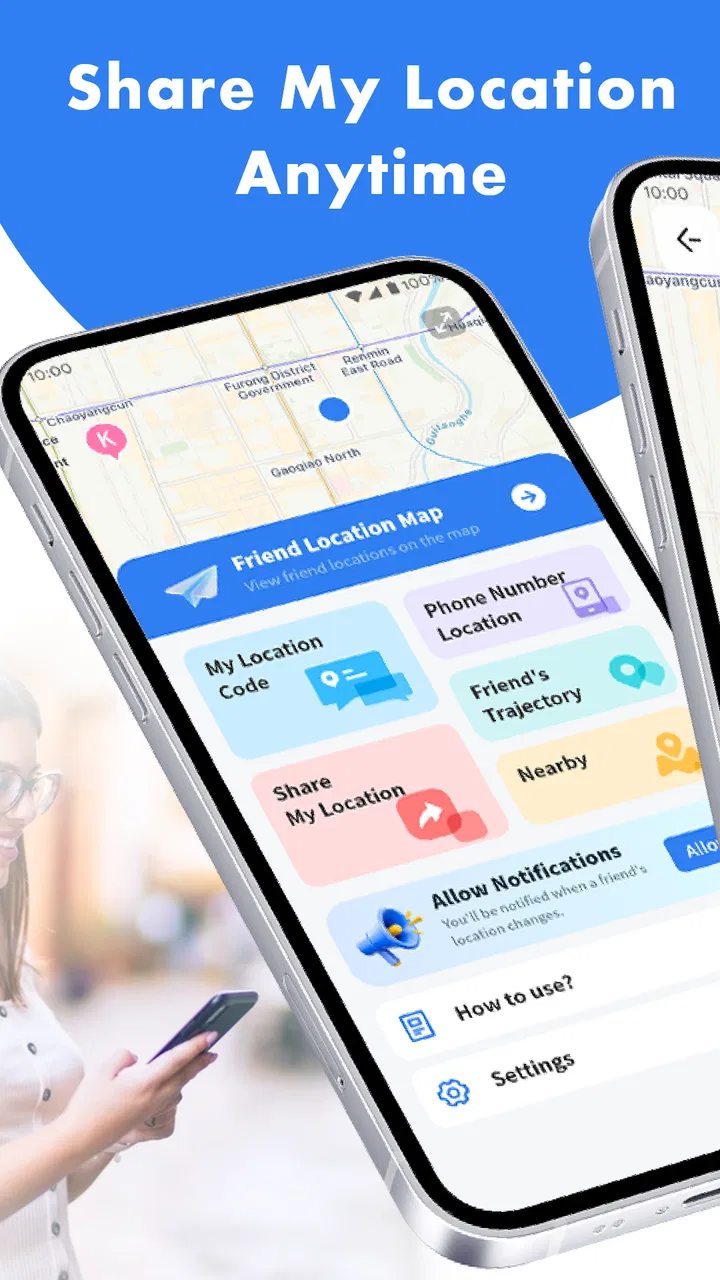
Location App-Phone Tracker
- 3.6
- Rating
- 100.00K
- Installs
- Free
- Price

 Analysis by App-foxy
I approached Location App-Phone Tracker as a small, focused tool for sharing whereabouts rather than as a complete navigation replacement. That distinction matters. Its purpose is easy to understand: help people share a location with someone they trust so both sides can feel more at ease. In practice, though, a location-sharing app deserves a more careful look than an ordinary utility because the most important question is not only whether it works, but whether I remain in control of when my location is visible and who can see it.
After using it, my impression is cautiously positive. The app is free, aimed at Everyone, and belongs to the Maps & Navigation category. It is published by GUANGSHENG LLC and is currently listed as version 1.1.1, with support for devices running Android 6.0 or later. Its audience is likely to include families, couples, friends meeting in unfamiliar places, and anyone who wants a simple location-sharing option without committing to a larger navigation platform.
Where Location App-Phone Tracker fits in everyday life
The most useful way to think about Location App-Phone Tracker is as a communication aid for specific situations. I would not install it expecting turn-by-turn directions, public transport planning, traffic intelligence, or the broad mapping tools found in Google Maps or Apple Maps. Those services are better when I need to plan a route or explore an area. This app makes more sense when the central task is letting another person know where I am.
You May Also Like

 Blood Strike: 2.5 Anniversary
Blood Strike’s Loadouts Turn Every Drop Into a Tactical Gamble
A close look at Blood Strike’s custom loadouts: how fast access to signature weapons reshapes its battle royale rhythm, rewards preparation, and narrows the gap between fights.

 Pandora - Music & Podcasts
Pandora’s Music Is Easy to Start, but Harder to Recover
Pandora’s strength is its low-effort path from a seed to a station. Its weak spot is how much confidence it asks you to place in connection, setup, and quiet recovery.

 8 Ball Pool
 Is Built on Rivalries, Rematches, and Routine
A close look at the rivalries, rematches, shared routines, and unanswered safety questions that turn a quick pool match into a persistent mobile community.

 Samsung Music
’s Quiet Strength Is Playing What You Already Own
Its reach comes less from spectacle than from dependable access to a personal library. That simplicity is both the app’s strongest retention engine and its ceiling.

 AccuWeather: Weather Radar
AccuWeather Review: A Quick, Clear Forecast for Everyday Decisions
For everyday plans, the best forecast is the one you can understand quickly. AccuWeather makes rain timing, radar, and local conditions easy to act on, with a few trade-offs.

 Hill Climb Racing
Why Hill Climb Racing Still Turns Crashes Into One More Run
A tiny car, a bumpy hill and one more upgrade: Hill Climb Racing keeps resurfacing because its simple chaos makes every near-miss feel personal.
More From Our News Desk



A realistic example is an evening walk home. I could share my location with a family member before leaving, then stop sharing after arriving. The value is not that the app replaces a phone call; it gives the other person a way to check my position without repeatedly asking me to send updates. The same approach can work when meeting a friend in a busy area, waiting for someone who is driving, or coordinating a group that may arrive at different times.
That narrow focus is also its main limitation. If I need a detailed map, a saved route, offline guidance, or a large ecosystem of places and transport information, I would choose a conventional navigation app. Location App-Phone Tracker is more appropriate when the person on the other end matters more than the destination.
The app has reached over 100,000 installs and holds an average rating of 3.6 from roughly 500 ratings. Those figures suggest that it has attracted a meaningful early audience, while also showing that the experience is not universally satisfying. I would treat that rating as a reason to test it carefully with a trusted contact rather than as a guarantee that it will suit every phone or sharing habit.
Getting started without overcomplicating the job
For a location tool, the first-use experience should be judged by how clearly it explains the sharing process. I pay attention to every prompt involving location access, because approving access too quickly can make it difficult to remember what I allowed later. My advice is to read each system request and choose the narrowest permission that still supports the way I intend to use the app.
I would also decide in advance who should receive my location. A trusted family member or close friend is a sensible first test. I would not begin by sharing with a broad group, forwarding access casually, or using the app in a sensitive situation before I understood its controls. A short test at home can reveal whether the other person receives the expected information and whether I can stop sharing without confusion.
This is one of the app’s less obvious practical lessons: location sharing works best when it is treated as a temporary arrangement, not as a permanent background habit. Before starting a journey, I can tell the recipient why I am sharing and when I expect to stop. That simple agreement reduces the chance of leaving access active long after the original reason has disappeared.
Trust begins with visible choices
Location data is unusually personal because it can reveal routines, workplaces, homes, and periods when someone is alone. I therefore look for visible user choices rather than relying on reassuring language. The important controls are the ones I can actually see and use: whether I can choose a recipient, whether I can decide when sharing starts, and whether ending the session is straightforward.
I would not assume that an app is private simply because its purpose sounds protective. The phrase “safe sharing” can describe a helpful intention, but it does not by itself explain how access is managed. My own practice is to keep the app’s role limited: use it for a defined journey or meeting, then review the screen and device settings afterward. If I cannot tell whether sharing has ended, I would pause before using it for anything sensitive.
There is a useful difference between convenience and control here. A service that makes sharing effortless may be pleasant, but the best experience is one that also makes stopping effortless. I value a clear end point more than an extra shortcut. For this type of app, a slightly slower confirmation is preferable to silently continuing location exposure.
Permissions deserve more attention than the map screen
When I evaluate a location-sharing app, I spend more time on permission prompts and account choices than on its visual design. The map itself is not the privacy decision; the decision happens when the phone asks for access and when I choose whom to involve. I recommend checking the operating system’s location settings after installation, especially if the app is used only occasionally.
On Android, a user can review application permissions through the device settings. That review is useful after a trial because it confirms what access remains available at the system level. If I stop using the app, revoking its location access is a sensible cleanup step. This does not replace checking the app itself, but it gives me an additional layer of control outside the app’s interface.
I would also avoid testing it on a child’s phone or another person’s device without explaining what location sharing means. The Everyone age classification describes the intended content audience, but it does not remove the need for responsible consent. A young user may understand the map but not the long-term implications of sharing regular movements.
Another practical point is battery and connectivity. Any location-based experience depends on the phone being powered and connected well enough to communicate. I would not use it as my only safety plan during a long trip, in an area with unreliable service, or when the phone battery is nearly empty. A charged phone, a clear check-in plan, and a backup contact method remain more dependable than any single app.
What to do in sensitive situations
The safest workflow is to share less information for less time. If I am meeting a friend, I can share only for the period needed to find one another. If I am walking home, I can agree that the recipient will check once rather than monitor continuously. If plans change, I should tell the recipient directly instead of assuming the app communicates the change for me.
I would be especially careful when sharing from home, work, school, or another place I visit regularly. A location that seems harmless in the moment can reveal a routine when viewed repeatedly. For that reason, I would avoid granting access to people I do not know well and would never treat a shared location as something that can be forwarded freely.
There is also a social trade-off. Location sharing can reassure relatives, but permanent monitoring can create pressure and misunderstandings. I prefer to frame the app as an agreed convenience rather than proof of trust. Both people should know why the location is being shared, who can access it, and when the arrangement ends. That conversation is more important than any button in the interface.
Comparing it with familiar alternatives
Google Maps and Apple Maps are stronger choices for navigation itself. They are designed around finding places, planning journeys, and understanding an area. Their location-sharing functions may be enough for people who already use those platforms and want everything in one place. I would choose one of them when I need directions and location sharing together.
Messaging apps can also be more convenient for one-off sharing. If I am already chatting with a friend, sending a temporary location through that conversation may avoid asking the person to install another tool. The advantage of a dedicated app is focus: it can keep the location-sharing task separate from a busy chat history. The disadvantage is the extra app, extra permission review, and another place where I need to understand access.
Family-focused tracking services may offer broader supervision features, but that can be excessive for a simple meeting or walk home. Location App-Phone Tracker is potentially a better fit for someone who wants a narrower purpose and does not need a full family-management system. On the other hand, users who require detailed history, structured alerts, or extensive household administration should compare those specialized services carefully before choosing this one.
This comparison leads to a useful decision rule: choose the app that matches the relationship and the duration of the need. For a short, mutual arrangement between trusted adults, a focused location tool can feel less intrusive. For route planning, use a navigation platform. For ongoing family supervision, investigate a service built specifically for that responsibility.
Small habits that make the experience safer
I would begin with a controlled trial rather than immediately depending on the app. Share with one trusted person, remain in a familiar area, and confirm that both sides understand what is visible. Then stop sharing and check the result. This test answers a practical question that a store summary cannot: whether the workflow feels clear enough to use when I am distracted or in a hurry.
I would name the purpose in the conversation, not just send access without context. “I am sharing while I travel home” is better than an unexplained location link or invitation. I would also set a personal reminder to review sharing after reaching the destination. Even if the app offers a convenient way to end access, a reminder protects against forgetting.
For group events, I would avoid assuming that everyone needs everyone else’s location. A single coordinator may be enough, while other participants can share directly only when necessary. This reduces the number of people handling sensitive information and keeps the arrangement easier to understand.
Finally, I would revisit the phone’s permissions after updating or changing how I use the app. The current version is 1.1.1, and ordinary app maintenance can change the way a permission prompt appears. I do not treat an update as a reason for alarm, but I do use it as a convenient moment to check that my choices still match my intentions.
Who should use it, and who should skip it
I can recommend trying Location App-Phone Tracker to people who want a straightforward way to share their whereabouts with a trusted contact. It may suit a student walking between locations, a couple coordinating arrivals, a traveler meeting a friend, or a family member who wants occasional reassurance without adopting a larger tracking platform.
I would be more hesitant to recommend it to someone who needs professional-grade navigation, dependable offline operation, detailed journey records, or a broad emergency-response system. I would also suggest skipping it if the people involved cannot agree clearly about access and timing. An app cannot solve a trust problem, and continuous tracking should not become the default simply because it is technically convenient.
The free price makes experimentation easier, but free does not mean that privacy decisions become unimportant. I would still read the prompts, limit sharing, and remove access when the need ends. The Everyone rating may make the app approachable for a broad audience, yet responsible use still depends on the maturity of the people sharing and receiving the location.
My cautious verdict
Location App-Phone Tracker has a clear, useful role: it is a focused Maps & Navigation app for sharing location with someone who needs reassurance or coordination. I like the simplicity of that idea, and I can see genuine value in using it for short, clearly defined situations. Its strongest quality is not replacing established map services, but concentrating on the human question of letting another person know where I am.
My recommendation comes with boundaries. I would test the sharing and stopping process before relying on it, keep the recipient list small, review device permissions, and avoid treating it as a substitute for a charged phone, communication plan, or emergency service. I would also compare it with a messaging app or an established map platform if I already have the same function available there.
Overall, I see it as a reasonable option for users who want a dedicated location-sharing experience and are willing to stay attentive to access. The average rating of 3.6 reflects a product worth approaching with realistic expectations rather than automatic confidence. For me, the deciding factor is user agency: if I can understand when sharing is active, who receives it, and how to end it, the app can be useful. If those choices feel unclear on my device, I would choose a more familiar alternative instead.
FAQs for Location App-Phone Tracker
01How does the Location App-Phone Tracker ensure my privacy and data security?
The Location App-Phone Tracker prioritizes user privacy by employing advanced encryption techniques. All location data is stored securely and shared only with authorized users. The app complies with international data protection laws, ensuring that your information remains confidential. Users can also customize privacy settings to control who can access their location data.
02Is the Location App-Phone Tracker compatible with all devices?
The app is designed to work seamlessly on both Android and iOS platforms. It supports a wide range of devices, ensuring compatibility with most smartphones and tablets. Users are advised to check for the latest app version in their respective app stores to guarantee full functionality and access to all features.
03What features does the Location App-Phone Tracker offer?
This app provides real-time location tracking, location history, and geofencing capabilities. Users can set up safe zones and receive alerts when someone enters or leaves these areas. The app also offers a panic button feature for emergencies, making it a comprehensive safety tool for families and individuals.
04Does the app consume a lot of battery power?
While continuous GPS usage can impact battery life, the Location App-Phone Tracker is optimized to minimize battery consumption. It uses smart algorithms to efficiently manage location updates. Users can adjust the frequency of updates in the settings to balance between battery use and tracking precision.
05Can I use the app internationally?
Yes, the Location App-Phone Tracker is designed for global use, allowing you to track locations anywhere worldwide. However, users should ensure they have an active internet connection, either through local Wi-Fi or mobile data, to maintain functionality. Be mindful of potential roaming charges when traveling internationally.
Pros
- Accurate location tracking in real-time.
- User-friendly interface with easy navigation.
- Battery optimization for longer usage.
- Customizable alerts for specific locations.
- Supports multiple device tracking.
Cons
- Requires constant internet connection.
- May drain battery on older devices.
- Limited features in the free version.
- Potential privacy concerns with data.
- Occasional inaccuracies in dense areas.

Location App-Phone Tracker
Gallery